en
IMPORTANT

The Owner's Manual for this vehicle contains warnings, instructions and other information you must read and fully understand before safely riding or performing maintenance on this vehicle. Always follow the warnings and instructions in Owner's Manual.

Click the link above for the Table Of Contents, or download a full PDF of the Owner Manual in the Owner Support area of Polaris.com.

Gauges

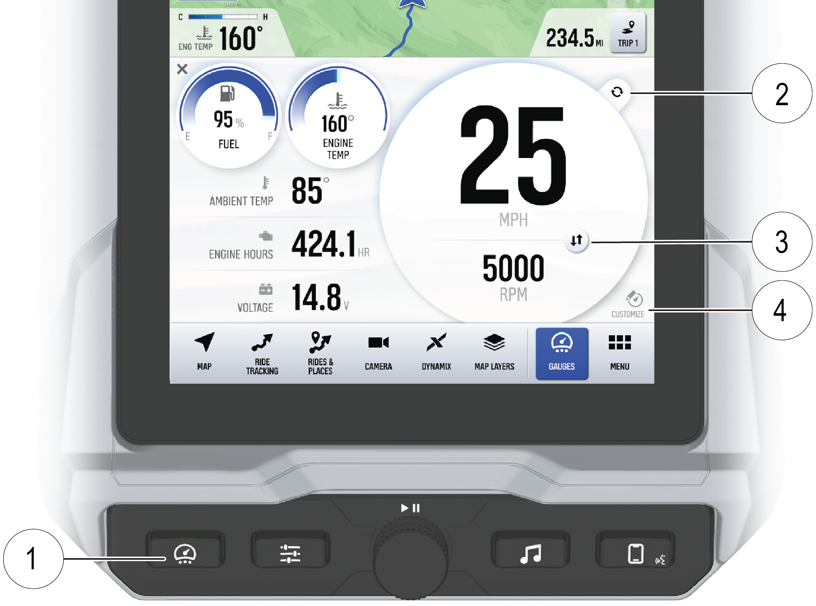
Press the Gauges button 1 to toggle between the two preconfigured gauges. Additional gauges can be added or removed as needed.

Gauge View Mode

Tap 2 to toggle between the two available gauge view modes, Analog and Digital.

While in the digital gauge view mode, press 3 to invert the MPH and RPM units.

Customize Gauges

Each gauge is customizable and can be set up in the following configurations:

  • Four round widgets

  • Two round widgets and a list of three data values

  • A list of five data values

To edit gauges, tap Customize 4 located in the lower right corner of the display. Select the layout and data values to display on the gauge. When finished customizing, tap Done.