Multi-Function Display
WARNING
Driving while distracted can result in loss of
vehicle control, crash and serious injury or death. Use extreme caution
when using any device that may take your focus off the road.
Use the mode button to toggle through the modes of the multi-function display. See Mode Button. Press and hold the mode button to reset the trip odometers and average fuel economy.
| Modes Available | |
|---|---|
| Fuel Level Gauge | Fuel Range |
| Trip Odometer 1 | Average Fuel Economy |
| Trip Odometer 2 | Clock |
| Ambient Air Temperature | |
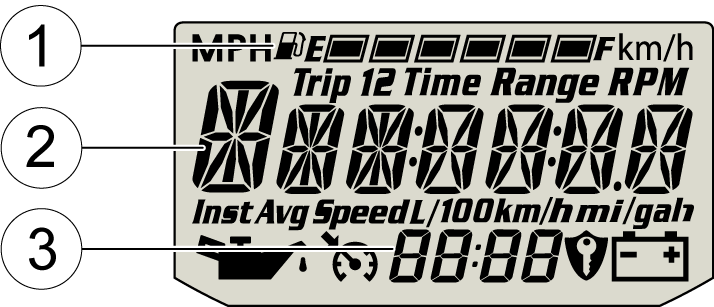
Fuel Gauge Display 1 - The segments of the fuel gauge show the level of fuel in the fuel tank. When the last segment clears, a low fuel warning is activated. All segments including the fuel icon will flash. Refuel immediately
TIP
If the fuel icon fails to display, an open or short
circuit has occurred in the fuel sensor circuit. Your dealer can inspect
the vehicle and perform service.
Information Display 2 - This area displays odometer, trip meters (2), air temperature and fuel economy.
Clock Display 3 - The clock displays time in a 12-hour or 24-hour format. See Display Units (Standard/Metric) for resetting instructions.